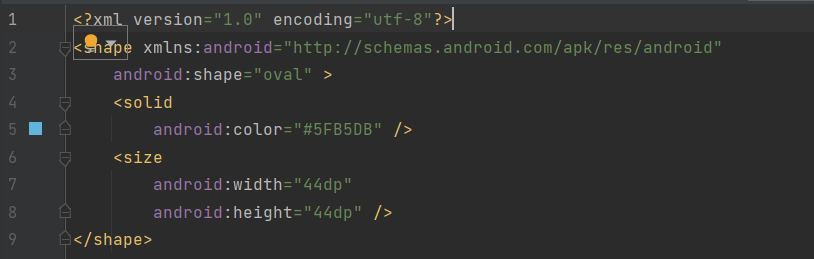
Shape Drawable을 사용하여 원형과 background를 바꿔 로또 번호를 생성하는 추첨기를 만들어볼 것이다.
Layout과 Kotlin 코드를 함께 사용할 예정이다.
Layout을 그리는 법
- ConstraintLayout 사용하기
- NumberPicker의 속성들과 사용하는 법
- TextView의 속성들과 사용하는 법
- Button 사용하는 법
📌 알게 된 점
1. 원형을 사용하려면 drawable resource(드로어블 리소스)를 활용하면 된다.
드로어블 리소스 | Android 개발자 | Android Developers
드로어블 리소스 컬렉션을 사용해 정리하기 내 환경설정을 기준으로 콘텐츠를 저장하고 분류하세요. 드로어블 리소스는 화면에 그릴 수 있으며 getDrawable(int)와 같은 API를 사용하여 가져오거나 a
developer.android.com
2. mutableListOf는 수정할 수 있는 list이다.
3. Collection Set은 중복되지 않는다.

4. view 2개를 나란히 정렬하기 위해서 chainStyle을 사용한다.

5. Activity에서 drawable을 가져와 쓰려면 ContextCompat.getDrawable을 사용한다.
6. NumberPicker을 사용하려면 minValue와 maxValue를 미리 설정해줘야 한다.
📌 최종 코드
- Activity
MainActivity.kt
package com.example.lotto

import androidx.appcompat.app.AppCompatActivity
import android.os.Bundle
import android.util.Log
import android.widget.Button
import android.widget.NumberPicker
import android.widget.TextView
import android.widget.Toast
import androidx.core.content.ContextCompat
import androidx.core.view.isVisible

class MainActivity : AppCompatActivity() {
    private val addButton: Button by lazy {
        findViewById<Button>(R.id.addButton)
    }

    private val clearButton: Button by lazy {
        findViewById<Button>(R.id.clearButton)
    }

    private val runButton: Button by lazy {
        findViewById<Button>(R.id.runButton)
    }

    private val numberPicker: NumberPicker by lazy {
        findViewById<NumberPicker>(R.id.numberPicker)
    }

    private val numberTextViewList: List<TextView> by lazy {
        listOf<TextView>(
            findViewById<TextView>(R.id.textView1),
            findViewById<TextView>(R.id.textView2),
            findViewById<TextView>(R.id.textView3),
            findViewById<TextView>(R.id.textView4),
            findViewById<TextView>(R.id.textView5),
            findViewById<TextView>(R.id.textView6),
        )
    }
    private var didRun = false
    private val pickNumberSet = hashSetOf<Int>() // 중복 불가

    override fun onCreate(savedInstanceState: Bundle?) {
        super.onCreate(savedInstanceState)
        setContentView(R.layout.activity_main)

        numberPicker.minValue = 1
        numberPicker.maxValue = 45

        initRunButton()
        initAddButton()
        initClearbutton()
    }

    private fun initRunButton() {
        runButton.setOnClickListener {
            val list = getRandomNumber()
            didRun = true
            list.forEachIndexed { index, number ->
                val textView = numberTextViewList[index]
                textView.text = number.toString()
                textView.isVisible = true

                setNumberBackground(number, textView)
            }
            Log.d("MainActivity", list.toString())
        }
    }

    private fun initAddButton() {
        addButton.setOnClickListener {
            if(didRun) {
                Toast.makeText(this, "초기화 후에 시도해주세요", Toast.LENGTH_SHORT).show()
                return@setOnClickListener
            }
            if (pickNumberSet.size >= 5) {
                Toast.makeText(this, "번호는 5개까지만 선택 가능합니다.",Toast.LENGTH_SHORT).show()
                return@setOnClickListener
            }
            if (pickNumberSet.contains(numberPicker.value)) {
                Toast.makeText(this, "이미 선택한 번호입니다.",Toast.LENGTH_SHORT).show()
                return@setOnClickListener
            }
            val textView = numberTextViewList[pickNumberSet.size]
            textView.isVisible = true
            textView.text = numberPicker.value.toString()

            setNumberBackground(numberPicker.value, textView)

            pickNumberSet.add(numberPicker.value)
        }
    }

    private fun setNumberBackground(number: Int, textView: TextView) {
        when(number) {
            in 1..10 -> textView.background = ContextCompat.getDrawable(this, R.drawable.circle_yellow)
            in 11..20 -> textView.background = ContextCompat.getDrawable(this, R.drawable.circle_blue)
            in 21..30 -> textView.background = ContextCompat.getDrawable(this, R.drawable.circle_red)
            in 31..40 -> textView.background = ContextCompat.getDrawable(this, R.drawable.circle_gray)
            else -> textView.background = ContextCompat.getDrawable(this, R.drawable.circle_green)
        }
    }

    private fun initClearbutton() {
        clearButton.setOnClickListener {
            pickNumberSet.clear()
            didRun = false
            numberTextViewList.forEach {
                it.isVisible = false
            }
        }
    }

    private fun getRandomNumber(): List<Int> {
        val numberList = mutableListOf<Int>().apply {
            for (i in 1..45) {
                if(pickNumberSet.contains(i)) {
                    continue
                }
                this.add(i)
            }
        }
        numberList.shuffle() // 1~45 숫자 섞어줌
        val newList = pickNumberSet.toList() + numberList.subList(0, 6 - pickNumberSet.size)
        return newList.sorted()

    }
}
- layout
activity_main.xml
<?xml version="1.0" encoding="utf-8"?>
<androidx.constraintlayout.widget.ConstraintLayout xmlns:android="http://schemas.android.com/apk/res/android"
    xmlns:app="http://schemas.android.com/apk/res-auto"
    xmlns:tools="http://schemas.android.com/tools"
    android:layout_width="match_parent"
    android:layout_height="match_parent"
    tools:context=".MainActivity">

    <NumberPicker
        android:id="@+id/numberPicker"
        android:layout_width="wrap_content"
        android:layout_height="wrap_content"
        android:layout_marginTop="100dp"
        app:layout_constraintEnd_toEndOf="parent"
        app:layout_constraintStart_toStartOf="parent"
        app:layout_constraintTop_toTopOf="parent" />

    <Button
        android:id="@+id/addButton"
        android:layout_width="wrap_content"
        android:layout_height="wrap_content"
        android:layout_marginTop="10dp"
        android:layout_marginEnd="16dp"
        android:text="@string/numberAdd"
        app:layout_constraintEnd_toStartOf="@id/clearButton"
        app:layout_constraintHorizontal_chainStyle="packed"
        app:layout_constraintStart_toStartOf="parent"
        app:layout_constraintTop_toBottomOf="@id/numberPicker" />

    <!-- margin 코드를 반복하지 않기 위해 TopTop 제약을 걸어준다-->
    <Button
        android:id="@+id/clearButton"
        android:layout_width="wrap_content"
        android:layout_height="wrap_content"
        android:text="@string/reset"
        app:layout_constraintEnd_toEndOf="parent"
        app:layout_constraintStart_toEndOf="@id/addButton"
        app:layout_constraintTop_toBottomOf="@id/numberPicker"
        app:layout_constraintTop_toTopOf="@id/addButton" />

    <LinearLayout
        android:layout_width="0dp"
        android:layout_height="wrap_content"
        android:layout_marginTop="30dp"
        android:gravity="center"
        app:layout_constraintEnd_toEndOf="parent"
        app:layout_constraintStart_toStartOf="parent"
        app:layout_constraintTop_toBottomOf="@id/addButton">

        <TextView
            android:id="@+id/textView1"
            android:layout_width="wrap_content"
            android:layout_height="wrap_content"
            android:layout_margin="5dp"
            android:background="@drawable/circle_blue"
            android:gravity="center"
            android:text="1"
            android:textColor="@color/white"
            android:textSize="18sp"
            android:textStyle="bold"
            android:visibility="gone"
            tools:visibility="visible" />

        <TextView
            android:id="@+id/textView2"
            android:layout_width="wrap_content"
            android:layout_height="wrap_content"
            android:layout_margin="5dp"
            android:background="@drawable/circle_yellow"
            android:gravity="center"
            android:text="1"
            android:textColor="@color/white"
            android:textSize="18sp"
            android:textStyle="bold"
            android:visibility="gone"
            tools:visibility="visible" />

        <TextView
            android:id="@+id/textView3"
            android:layout_width="wrap_content"
            android:layout_height="wrap_content"
            android:layout_margin="5dp"
            android:background="@drawable/circle_red"
            android:gravity="center"
            android:text="1"
            android:textColor="@color/white"
            android:textSize="18sp"
            android:textStyle="bold"
            android:visibility="gone"
            tools:visibility="visible" />

        <TextView
            android:id="@+id/textView4"
            android:layout_width="wrap_content"
            android:layout_height="wrap_content"
            android:layout_margin="5dp"
            android:background="@drawable/circle_gray"
            android:gravity="center"
            android:text="1"
            android:textColor="@color/white"
            android:textSize="18sp"
            android:textStyle="bold"
            android:visibility="gone"
            tools:visibility="visible" />

        <TextView
            android:id="@+id/textView5"
            android:layout_width="wrap_content"
            android:layout_height="wrap_content"
            android:layout_margin="5dp"
            android:background="@drawable/circle_gray"
            android:gravity="center"
            android:text="1"
            android:textColor="@color/white"
            android:textSize="18sp"
            android:textStyle="bold"
            android:visibility="gone"
            tools:visibility="visible" />

        <TextView
            android:id="@+id/textView6"
            android:layout_width="wrap_content"
            android:layout_height="wrap_content"
            android:layout_margin="5dp"
            android:background="@drawable/circle_gray"
            android:gravity="center"
            android:text="1"
            android:textColor="@color/white"
            android:textSize="18sp"
            android:textStyle="bold"
            android:visibility="gone"
            tools:visibility="visible" />
    </LinearLayout>

    <Button
        android:id="@+id/runButton"
        android:layout_width="0dp"
        android:layout_height="wrap_content"
        android:layout_marginHorizontal="16dp"
        android:layout_marginBottom="16dp"
        android:text="@string/autoStart"
        app:layout_constraintBottom_toBottomOf="parent"
        app:layout_constraintEnd_toEndOf="parent"
        app:layout_constraintStart_toStartOf="parent" />
</androidx.constraintlayout.widget.ConstraintLayout>
- drawable

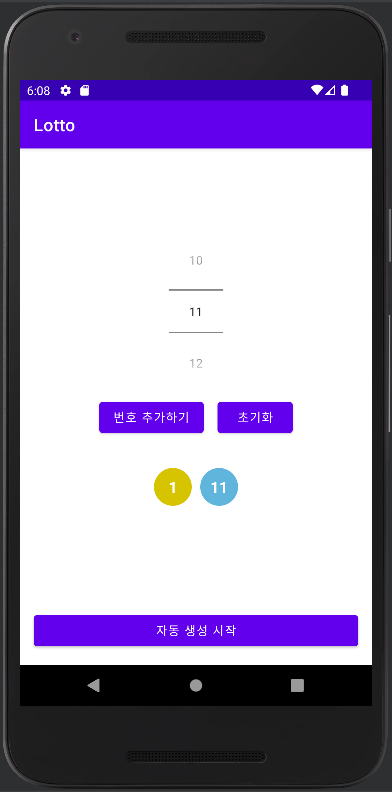
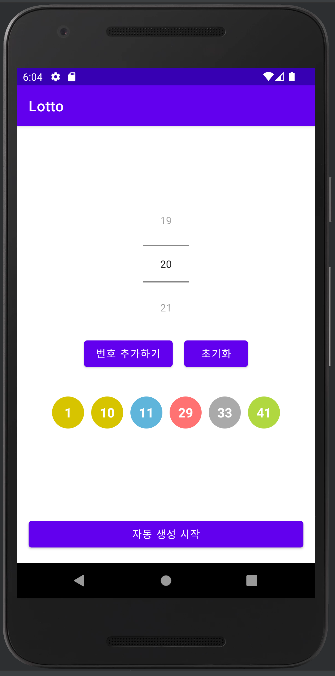
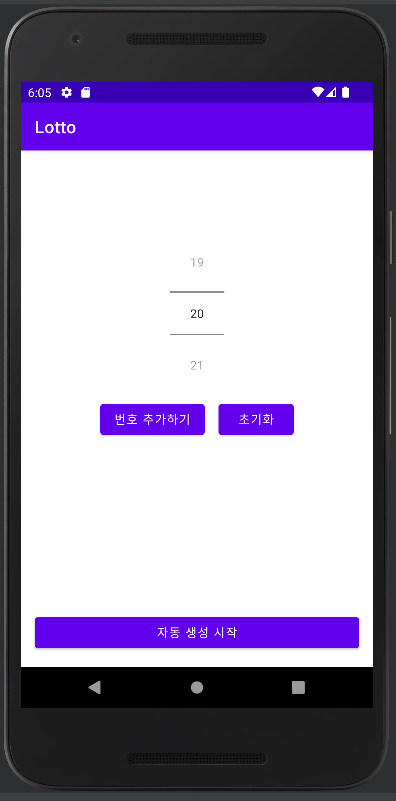
번호를 추가할 수 있고, 자동 생성을 시작해 추가한 것을 제외한 나머지 숫자들을 랜덤으로 뽑을 수 있다.
그리고 초기화를 해주면 번호가 보이지 않고, clear가 된 것을 볼 수 있다.
'🍞 FrontEnd > Android' 카테고리의 다른 글
| [Android] 에뮬레이터에서 Toast 메세지가 안 보일 때 (0) | 2022.10.31 |
|---|---|
| [Android] 비밀 다이어리 (0) | 2022.10.28 |
| [Android] BMI 계산기 (0) | 2022.10.27 |
| [Android] 안드로이드 리사이클러뷰(RecyclerView) (0) | 2022.10.23 |
| [Android] No speakable text present 경고 없애기 (0) | 2022.10.18 |