
📌 Memoization
메모이제이션은 컴퓨터 프로그램이 동일한 계산을 반복해야 할 때, 이전에 계산한 값을 메모리에 저장함으로써 동일한 계산의 반복 수행을 제거하여 프로그램 실행 속도를 빠르게 하는 기술이다.
Memo.jsx
import React, { useState } from "react";
import Comments from "./Comments.jsx";

const commentList = [
  { title: "comment1", content: "message1", likes: 1 },
  { title: "comment2", content: "message2", likes: 1 },
  { title: "comment3", content: "message3", likes: 1 },
];

export default function Memo() {
  const [comments, setComments] = useState(commentList);

  return (
    <div>
      <Comments commentList={comments} />;
    </div>
  );
}
Comments.jsx
import React from "react";
import CommentItem from "./CommentItem.jsx";

export default function Comments({ commentList }) {
  return (
    <div>
      {commentList.map((comment) => (
        <CommentItem
          key={comment.title}
          title={comment.title}
          content={comment.content}
          likes={comment.likes}
        />
      ))}
    </div>
  );
}
CommentItem.jsx
import React from "react";
import "./CommentItem.css";

export default function CommentItem({ title, content, likes }) {
  return (
    <div className="CommentItem">
      <span>{title}</span> <br />
      <span>{content}</span> <br />
      <span>{likes}</span>
    </div>
  );
}
📌 React.memo
동일한 props로 렌더링을 한다면, React.memo를 사용하여 성능 향상을 누릴 수 있다.
memo를 사용하면 React는 컴포넌트를 렌더링하지 않고 마지막으로 렌더링된 결과를 재사용한다.
memo를 사용해보기 위해 최대한 안 좋은 상황을 만들어볼 것이다.
아래처럼 1초마다 setInterval을 사용해 컴포넌트를 추가할 것이다.
Memo.jsx
import React, { useState, useEffect } from "react";
import Comments from "./Comments.jsx";

const commentList = [
  { title: "comment1", content: "message1", likes: 1 },
  { title: "comment2", content: "message2", likes: 1 },
  { title: "comment3", content: "message3", likes: 1 },
];

export default function Memo() {
  const [comments, setComments] = useState(commentList);

  useEffect(() => {
    const interval = setInterval(() => {
      setComments((prevComments) => [
        ...prevComments,
        {
          title: `comment${prevComments.length + 1}`,
          content: `message${prevComments.length + 1}`,
          likes: 1,
        },
      ]);
    }, 1000);
    return () => {
      clearInterval(interval);
    };
  }, []);

  return (
    <div>
      <Comments commentList={comments} />;
    </div>
  );
}
Comment.jsx
import React from "react";
import CommentItem from "./CommentItem.jsx";

export default function Comments({ commentList }) {
  return (
    <div>
      {commentList.map((comment) => (
        <CommentItem
          key={comment.title}
          title={comment.title}
          content={comment.content}
          likes={comment.likes}
        />
      ))}
    </div>
  );
}
CommentItem.jsx
import React, { Profiler, memo } from "react";
import "./CommentItem.css";

function CommentItem({ title, content, likes }) {
  function onRenderCallback(
    id, // 방금 커밋된 Profiler 트리의 "id"
    phase, // "mount" 트리가 방금 마운트 된 경우 혹은 "update" 트리가 리렌더링 된 경우
    actualDuration, // 커밋된 업데이트를 렌더링하는데 걸린 시간
    baseDuration, // 메모이제이션 없이 하위 트리 전체를 렌더링하는데 걸리는 예상 시간
    startTime, // React가 언제 해당 업데이트를 렌더링하기 시작했는지
    commitTime, // React가 해당 업데이트를 언제 커밋했는지
    interactions // 이 업데이트에 해당하는 상호작용들의 집합
  ) {
    console.log(`actualDuration(${title}: ${actualDuration})`);
  }

  return (
    <Profiler id="CommentItem" onRender={onRenderCallback}>
      <div className="CommentItem">
        <span>{title}</span> <br />
        <span>{content}</span> <br />
        <span>{likes}</span>
      </div>
    </Profiler>
  );
}

export default memo(CommentItem);
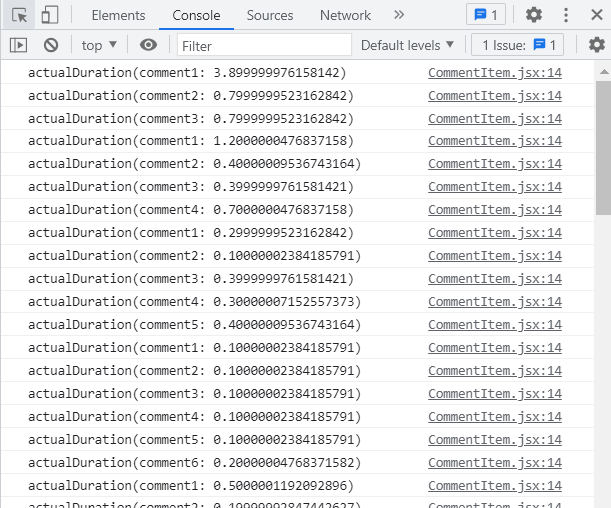
👇 export default CommentItem만 했을 경우와 export default memo(CommentItem)을 했을 경우
memo를 쓰기 전에는 하나씩만 그려지는 게 아니라 모든 것이 그려지는 것을 볼 수 있다. 매우 비효율적!!
Comments한테 props로 commentList가 넘어가기 때문에 Memo에서 계속 바꿔줬기 때문에 즉, 부모가 바껴서 자식들도 다 영향을 받아 계속 렌더링이 된 것이다. 그래서 자식들 중에 memo를 해놔야 이미 그려졌던 것들은 반복해서 그려지지 않는다.

❓ 제대로 최적화되는지 알고 싶다면 Profiler
Profiler는 React 애플리케이션이 렌더링하는 빈도와 렌더링 비용을 측정한다.
Profiler의 목적은 메모이제이션 같은 성능 최적화 방법을 활용할 수 있는 애플리케이션의 느린 부분들을 식별해준다.
Profiler API – React
A JavaScript library for building user interfaces
ko.reactjs.org
📌 useMemo, useCallback
특정한 값을 메모이제이션할 땐 useMemo
특정 함수를 메모이제이션할 땐 useCallback
Memo.jsx
import React, { useState, useEffect } from "react";
import Comments from "./Comments.jsx";

const commentList = [
  { title: "comment1", content: "message1", likes: 1 },
  { title: "comment2", content: "message2", likes: 1 },
  { title: "comment3", content: "message3", likes: 1 },
];

export default function Memo() {
  const [comments, setComments] = useState(commentList);

  useEffect(() => {
    const interval = setInterval(() => {
      setComments((prevComments) => [
        ...prevComments,
        {
          title: `comment${prevComments.length + 1}`,
          content: `message${prevComments.length + 1}`,
          likes: 1,
        },
      ]);
    }, 1000);
    return () => {
      clearInterval(interval);
    };
  }, []);

  return (
    <div>
      <Comments commentList={comments} />;
    </div>
  );
}
Comment.jsx
import React, { useCallback } from "react";
import CommentItem from "./CommentItem.jsx";

export default function Comments({ commentList }) {
  // Comments가 리렌더링 되지 않기 위해 useCallback 사용 (메모이제이션됨)
  const handleClick = useCallback(() => {
    console.log("눌림");
  }, []);

  return (
    <div>
      {commentList.map((comment) => (
        <CommentItem
          key={comment.title}
          title={comment.title}
          content={comment.content}
          likes={comment.likes}
          onClick={handleClick}
        />
      ))}
    </div>
  );
}
CommentItem.jsx
import React, { Profiler, memo, useState, useMemo } from "react";
import "./CommentItem.css";

function CommentItem({ title, content, likes, onClick }) {
  const [clickCount, setClickCount] = useState(0);

  function onRenderCallback(
    id, // 방금 커밋된 Profiler 트리의 "id"
    phase, // "mount" 트리가 방금 마운트 된 경우 혹은 "update" 트리가 리렌더링 된 경우
    actualDuration, // 커밋된 업데이트를 렌더링하는데 걸린 시간
    baseDuration, // 메모이제이션 없이 하위 트리 전체를 렌더링하는데 걸리는 예상 시간
    startTime, // React가 언제 해당 업데이트를 렌더링하기 시작했는지
    commitTime, // React가 해당 업데이트를 언제 커밋했는지
    interactions // 이 업데이트에 해당하는 상호작용들의 집합
  ) {
    console.log(`actualDuration(${title}: ${actualDuration})`);
  }

  const handleClick = () => {
    onClick();
    setClickCount((prev) => prev + 1);
    alert(`${title} 눌림`);
  };
  // 특정한 값을 메모이제이션 하는 것에 useMemo 사용
  const rate = useMemo(() => {
    console.log("rate check");
    return likes > 10 ? "Good" : "Bad";
  }, [likes]);

  return (
    // 최적화 됐는지 확인
    <Profiler id="CommentItem" onRender={onRenderCallback}>
      <div className="CommentItem" onClick={handleClick}>
        <span>{title}</span> <br />
        <span>{content}</span> <br />
        <span>{clickCount}</span> <br />
        <span>{rate}</span>
      </div>
    </Profiler>
  );
}

export default memo(CommentItem);'🍞 FrontEnd > React' 카테고리의 다른 글
| [Redux] React Redux 상태관리 라이브러리 (0) | 2022.11.01 |
|---|---|
| [React] Portals에 대해서 (0) | 2022.10.27 |
| [React] 합성 이벤트(SyntheticEvent) (0) | 2022.10.22 |
| [React] 네트워크 통신 Fetch API (0) | 2022.10.22 |
| [React] Error 다루기 (0) | 2022.10.21 |