
반응형
📌 구상 과정
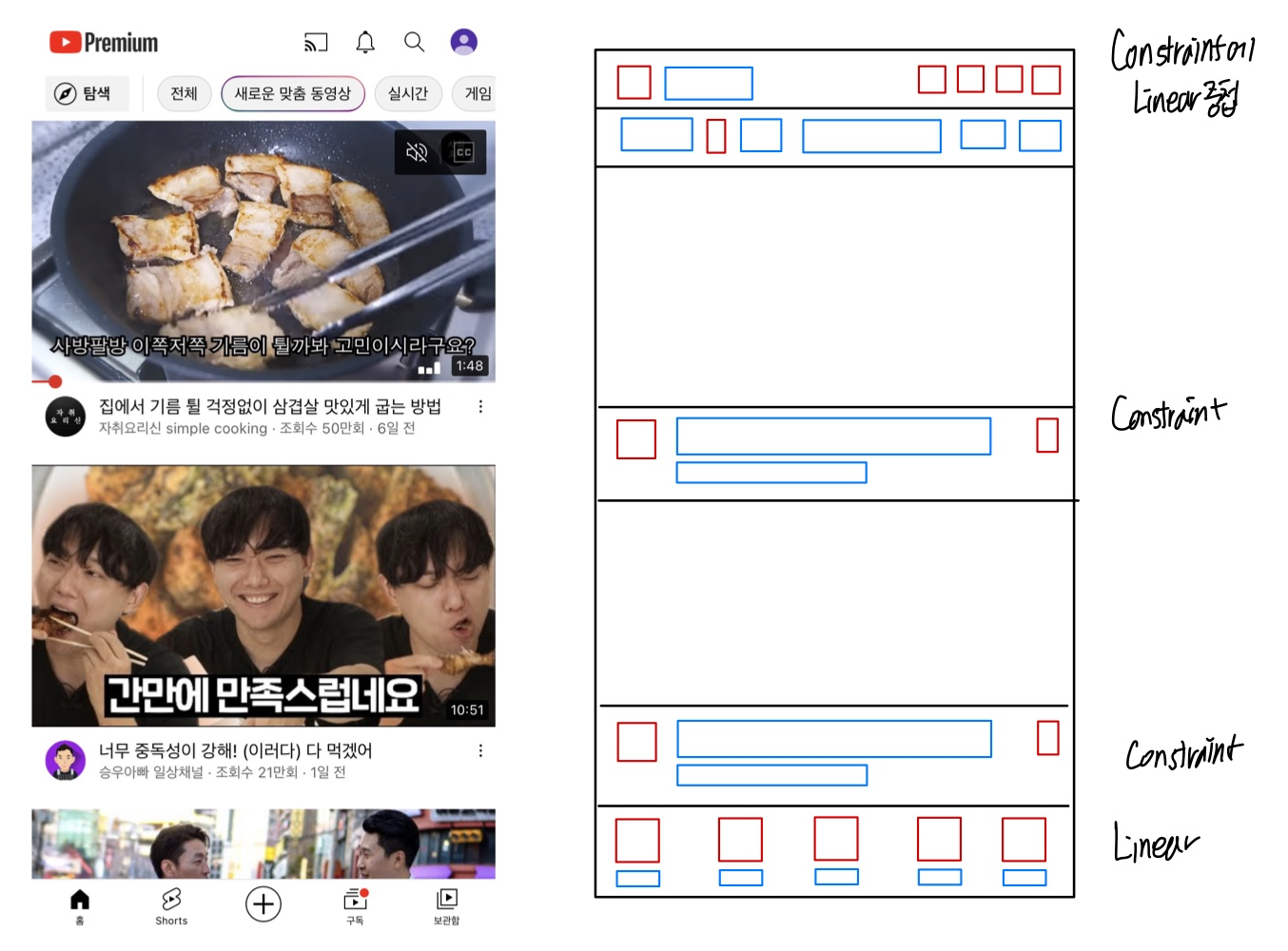
세 번째로 생각한 앱 화면은 유튜브다!
빨간색 ImageView, 파란색 TextView
📌 직접 구현하기


📌 Layout 설명
- Header - Constraint Layout 안에 Linear Layout 중첩,
- Body - Image View와 Constraint Layout
- Footer - Linear Layout
📌 새롭게 알게 된 점
이제 Layout과 View를 사용하여 웬만한 앱 화면은 직접 만들 수 있을 것 같다!
👇전체 코드
<?xml version="1.0" encoding="utf-8"?>
<androidx.constraintlayout.widget.ConstraintLayout xmlns:android="http://schemas.android.com/apk/res/android"
    xmlns:app="http://schemas.android.com/apk/res-auto"
    xmlns:tools="http://schemas.android.com/tools"
    android:layout_width="match_parent"
    android:layout_height="match_parent"
    tools:context=".MainActivity">

    <androidx.constraintlayout.widget.ConstraintLayout
        android:id="@+id/header"
        android:layout_width="match_parent"
        android:layout_height="30dp"
        android:layout_marginTop="20dp"
        android:layout_marginStart="10dp"
        android:layout_marginEnd="10dp"
        app:layout_constraintTop_toTopOf="parent"
        app:layout_constraintStart_toStartOf="parent"
        app:layout_constraintEnd_toEndOf="parent">

        <LinearLayout
            android:layout_width="match_parent"
            android:layout_height="match_parent"
            app:layout_constraintTop_toTopOf="parent"
            app:layout_constraintStart_toStartOf="parent"
            >
            <ImageView
                android:layout_width="35dp"
                android:layout_height="match_parent"
                android:src="@drawable/youtube_logo" />
            <TextView
                android:layout_width="wrap_content"
                android:layout_height="match_parent"
                android:layout_marginLeft="5dp"
                android:text="@string/logo"
                android:textColor="@color/black"
                android:textSize="22dp"
                android:textStyle="bold" />
        </LinearLayout>

        <LinearLayout
            android:layout_width="150dp"
            android:layout_height="match_parent"
            app:layout_constraintTop_toTopOf="parent"
            app:layout_constraintEnd_toEndOf="parent">
            <ImageView
                android:layout_width="0dp"
                android:layout_height="match_parent"
                android:layout_weight="1"
                android:src="@drawable/device"
                android:layout_marginRight="7dp"/>
            <ImageView
                android:layout_width="0dp"
                android:layout_height="match_parent"
                android:layout_weight="1"
                android:src="@drawable/bell"
                android:layout_marginRight="7dp"/>
            <ImageView
                android:layout_width="0dp"
                android:layout_height="match_parent"
                android:layout_weight="1"
                android:src="@drawable/search"
                android:layout_marginRight="7dp"/>
            <ImageView
                android:layout_width="0dp"
                android:layout_height="match_parent"
                android:layout_weight="1"
                android:src="@drawable/profile" />
        </LinearLayout>
    </androidx.constraintlayout.widget.ConstraintLayout>

   <ImageView
       android:id="@+id/image1"
       android:layout_width="match_parent"
       android:layout_height="230dp"
       android:src="@drawable/content1"
       android:layout_marginTop="20dp"
       app:layout_constraintTop_toBottomOf="@+id/header"
       app:layout_constraintStart_toStartOf="parent"/>

    <androidx.constraintlayout.widget.ConstraintLayout
        android:id="@+id/content1"
        android:layout_width="match_parent"
        android:layout_height="40dp"
        android:layout_marginTop="7dp"
        android:layout_marginStart="7dp"
        android:layout_marginEnd="7dp"
        android:layout_marginBottom="10dp"
        app:layout_constraintTop_toBottomOf="@+id/image1"
        app:layout_constraintStart_toStartOf="parent">

        <ImageView
            android:id="@+id/profile1"
            android:layout_width="50dp"
            android:layout_height="match_parent"
            android:src="@drawable/profile"
            app:layout_constraintTop_toTopOf="parent"
            app:layout_constraintStart_toStartOf="parent"/>
        <TextView
            android:id="@+id/title1"
            android:layout_width="wrap_content"
            android:layout_height="wrap_content"
            android:text="@string/title1"
            android:textColor="@color/black"
            android:textSize="15dp"
            android:layout_marginLeft="5dp"
            app:layout_constraintTop_toTopOf="parent"
            app:layout_constraintStart_toEndOf="@+id/profile1"/>
        <TextView
            android:id="@+id/subtitle1"
            android:layout_width="wrap_content"
            android:layout_height="wrap_content"
            android:text="@string/subtitle1"
            android:textColor="@color/gray"
            android:textSize="12dp"
            android:layout_marginLeft="5dp"
            android:layout_marginTop="1dp"
            app:layout_constraintTop_toBottomOf="@+id/title1"
            app:layout_constraintStart_toEndOf="@+id/profile1"/>
    </androidx.constraintlayout.widget.ConstraintLayout>

    <ImageView
        android:id="@+id/image2"
        android:layout_width="match_parent"
        android:layout_height="230dp"
        android:src="@drawable/content2"
        android:layout_marginTop="20dp"
        app:layout_constraintTop_toBottomOf="@+id/content1"
        app:layout_constraintStart_toStartOf="parent"/>

    <androidx.constraintlayout.widget.ConstraintLayout
        android:id="@+id/content2"
        android:layout_width="match_parent"
        android:layout_height="40dp"
        android:layout_marginTop="7dp"
        android:layout_marginStart="7dp"
        android:layout_marginEnd="7dp"
        android:layout_marginBottom="10dp"
        app:layout_constraintTop_toBottomOf="@+id/image2"
        app:layout_constraintStart_toStartOf="parent">

        <ImageView
            android:id="@+id/profile2"
            android:layout_width="50dp"
            android:layout_height="match_parent"
            android:src="@drawable/profile"
            app:layout_constraintTop_toTopOf="parent"
            app:layout_constraintStart_toStartOf="parent"/>
        <TextView
            android:id="@+id/title2"
            android:layout_width="wrap_content"
            android:layout_height="wrap_content"
            android:text="@string/title2"
            android:textColor="@color/black"
            android:textSize="15dp"
            android:layout_marginLeft="5dp"
            app:layout_constraintTop_toTopOf="parent"
            app:layout_constraintStart_toEndOf="@+id/profile2"/>
        <TextView
            android:id="@+id/subtitle2"
            android:layout_width="wrap_content"
            android:layout_height="wrap_content"
            android:text="@string/subtitle2"
            android:textColor="@color/gray"
            android:textSize="12dp"
            android:layout_marginLeft="5dp"
            android:layout_marginTop="1dp"
            app:layout_constraintTop_toBottomOf="@+id/title2"
            app:layout_constraintStart_toEndOf="@+id/profile2"/>
    </androidx.constraintlayout.widget.ConstraintLayout>

    <LinearLayout
        android:layout_width="match_parent"
        android:layout_height="32dp"
        app:layout_constraintBottom_toBottomOf="parent"
        app:layout_constraintStart_toStartOf="parent"
        android:layout_marginBottom="20dp">
        <ImageView
            android:layout_width="0dp"
            android:layout_height="match_parent"
            android:layout_weight="1"
            android:src="@drawable/home" />
        <ImageView
            android:layout_width="0dp"
            android:layout_height="match_parent"
            android:layout_weight="1"
            android:src="@drawable/device" />
        <ImageView
            android:layout_width="0dp"
            android:layout_height="match_parent"
            android:layout_weight="1"
            android:src="@drawable/circle" />
        <ImageView
            android:layout_width="0dp"
            android:layout_height="match_parent"
            android:layout_weight="1"
            android:src="@drawable/play" />
        <ImageView
            android:layout_width="0dp"
            android:layout_height="match_parent"
            android:layout_weight="1"
            android:src="@drawable/play3" />
    </LinearLayout>
</androidx.constraintlayout.widget.ConstraintLayout>
반응형
'🍞 대외활동 & 부트캠프 > IT연합동아리 UMC' 카테고리의 다른 글
| [UMC] Android 4주차 워크북 (LifeCycle) (0) | 2022.10.18 |
|---|---|
| [UMC] Android 3주차 워크북 (Activity와 Fragment) (0) | 2022.10.15 |
| [UMC] Android 2주차 워크북 (Layout) - 인스타그램 (0) | 2022.10.02 |
| [UMC] Android 2주차 워크북 (Layout) - 당근마켓 (0) | 2022.10.01 |
| [UMC] Android 2주차 워크북 (Layout) (0) | 2022.10.01 |